Total Launcher Key
- 4.4
- Rating
- 10.00K
- Installs
- $7.99
- Price

 Analysis by App-foxy
I approached Total Launcher Key as a decision rather than a simple download: is it worth paying for a personalization tool when Android already offers a home screen, widgets, icon arrangements, and a growing selection of free launchers? After using it, my answer is yes for people who enjoy building a phone layout around their own habits. It is much less convincing for anyone who wants a quick visual refresh with almost no setup.
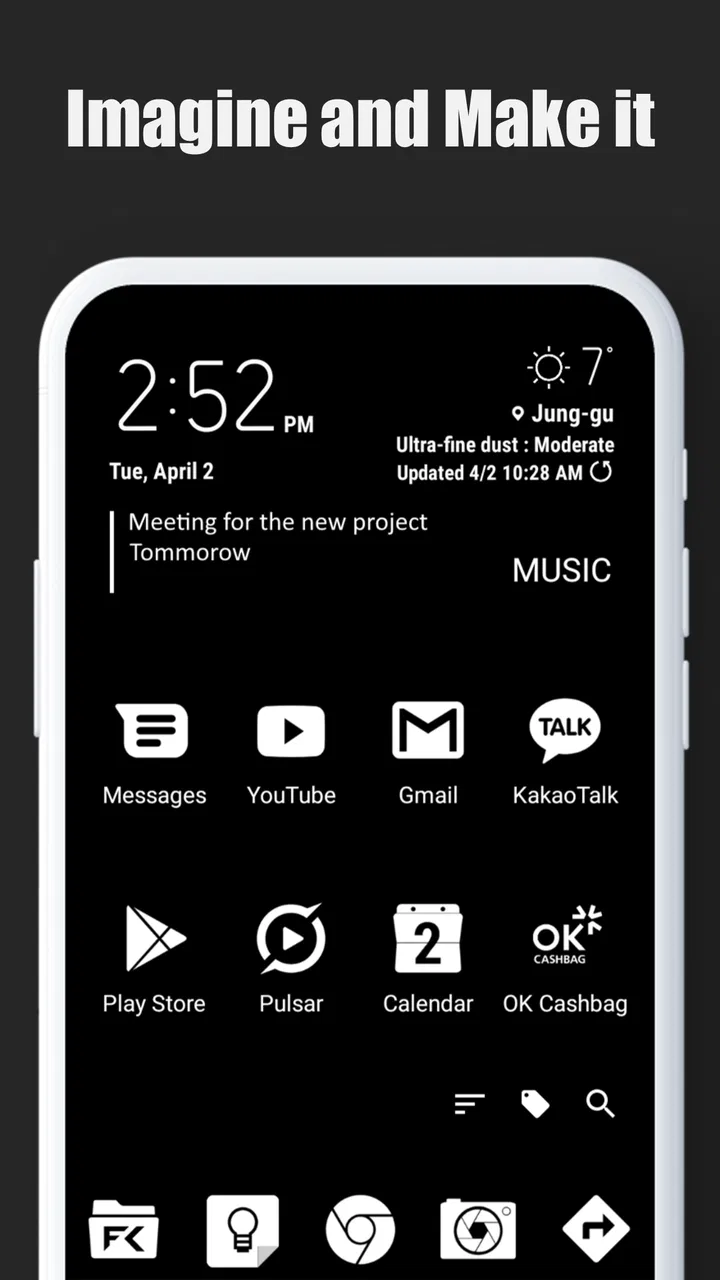
This is a personalization app from Total_Apps, and its role is best understood as an unlock for the Total Launcher experience rather than a conventional launcher that replaces everything by itself. The idea is appealingly direct: instead of accepting the standard home screen as a fixed surface, you can treat it as a canvas and shape it around the way you actually use your phone. That distinction matters, because the value here comes from control, not from a single collection of ready-made wallpapers or icons.
The app is available for Android devices running version 8.0 or later. It carries an Everyone age rating, costs $7.99, and is currently at version 7. Those details put it in an interesting position: it is a paid personalization purchase with a relatively broad device floor, but it still asks you to invest time learning and arranging the environment. I would not buy it simply because I want a different color scheme. I would buy it because I want my home screen to behave differently.
You May Also Like

 Pandora - Music & Podcasts
Pandora’s Music Is Easy to Start, but Harder to Recover
Pandora’s strength is its low-effort path from a seed to a station. Its weak spot is how much confidence it asks you to place in connection, setup, and quiet recovery.

 AccuWeather: Weather Radar
AccuWeather Review: A Quick, Clear Forecast for Everyday Decisions
For everyday plans, the best forecast is the one you can understand quickly. AccuWeather makes rain timing, radar, and local conditions easy to act on, with a few trade-offs.

 Hill Climb Racing
Why Hill Climb Racing Still Turns Crashes Into One More Run
A tiny car, a bumpy hill and one more upgrade: Hill Climb Racing keeps resurfacing because its simple chaos makes every near-miss feel personal.

 AliExpress - Shopping App
AliExpress Makes Global Shopping Feel Personal, but Shoppers Bear the Risk
AliExpress turns a global marketplace into a pocket-sized discovery engine. Its reach is useful, its shopping loop compelling, and its trade-offs easy to miss.

 Lords Mobile: Kingdom Wars
Lords Mobile Is a Kingdom-Building Routine, Not a Quick Match
A case-by-case verdict on the building, battles, device demands, and social commitments that make Lords Mobile rewarding for some players and exhausting for others.

 PDF Scanner app - TapScanner
TapScanner Makes Paperwork Easier to Capture, Check, and Share
TapScanner makes scanning with a phone feel less like a rescue operation and more like a dependable step in getting work done. Its capture tools are useful, though not flawless.
More From Our News Desk
View All News


What to consider before choosing it
I’d use this section to weigh the practical commitment against the appeal of a highly personal home screen. The key question is whether you enjoy shaping how your phone works, not just changing how it looks; that distinction helps clarify where the app earns its place and where a simpler choice may be smarter.
Decide whether you want a theme or a working layout
The first question is the most important one. Many people say they want customization when they really want a new wallpaper, a cleaner icon pack, or a launcher with a few attractive presets. Total Launcher Key is better suited to a deeper kind of customization. I found its appeal strongest when I thought in terms of tasks: what should be visible immediately, what should be hidden until needed, and how much information should fit on one screen without making the phone feel noisy?
That makes it useful for very different people. A busy user could build a practical first page with calendar access, communication shortcuts, and frequently used tools. Someone who likes a minimalist phone could reduce the visible choices and keep only a few carefully placed actions. A hobbyist could spend time refining spacing, grouping, and visual hierarchy until the screen feels personal rather than factory-made.
The trade-off is that this freedom creates decisions. You may need to experiment before the layout feels natural. A free launcher with a polished setup wizard can get you to a pleasant result faster. Total Launcher Key makes more sense when the process of arranging the phone is part of the appeal, or when ordinary launcher grids keep forcing you into compromises.
Look beyond the first impression
A screenshot can make any customization app look impressive, but screenshots do not show the cost of maintaining a layout. I paid attention to whether a design remained usable after the novelty faded. The strongest approach is to begin with the parts of the phone you touch most often and build outward. Put the actions you repeat every day in predictable places, then use decorative elements only where they do not interfere with those movements.
One practical insight is to design for interruption rather than for a perfect idle screen. Calls, messages, navigation, and quick searches often happen when you are in a hurry. A beautiful arrangement that requires hunting through several areas is less successful than a simpler one that helps you act immediately. Total Launcher Key rewards this kind of deliberate planning because it gives you room to organize the screen around routines instead of accepting the standard arrangement.
I also recommend keeping a plain fallback layout while experimenting. Customization can become a small project, and it is easy to move too many elements at once. Changing one area at a time makes it easier to tell which adjustment improved the experience and which one merely looked interesting for a few minutes.
Understand the role of the paid key
The word “Key” is important. This is not the kind of purchase I would describe as a complete standalone visual makeover. Its purpose is tied to the Total Launcher ecosystem, so anyone considering it should already be comfortable with that approach. If you expect the key to transform an unrelated launcher or automatically create a finished design, you may be disappointed.
That structure can actually be an advantage. A dedicated unlock gives the main launcher a clear direction instead of mixing unrelated customization tools into one crowded package. But it also means the purchase decision should happen after you have tried the underlying launcher and decided that its style of customization suits you. Paying first and discovering that you prefer a simpler launcher is an avoidable mistake.
Where Total Launcher Key wins
What stands out to me is how the Total Launcher approach lets you organize a home screen around the actions you actually repeat. I’ll focus here on the difference between a layout that merely looks distinctive and one that helps you find everyday tools with less friction.
It treats the home screen as a personal workspace
My favorite quality is the sense that the home screen does not have to remain a row of icons sitting above a wallpaper. You can think in zones and priorities. A top area can handle information, a central area can hold the actions you use constantly, and a lower area can be reserved for comfortable one-handed access. This type of arrangement is more meaningful than merely changing icon shapes.
That flexibility is particularly useful on phones with different screen sizes. A layout that works well on a compact device may feel awkward on a larger one, especially if important actions are placed too high. Rather than copying someone else’s design exactly, I would use their idea as a starting point and then move controls toward the areas your thumb naturally reaches.
The real strength is not decoration; it is turning the home screen into a system that reflects your routine. That is why the app can feel more valuable over time than a theme that looks exciting on the first day and becomes invisible afterward.
It encourages purposeful organization
Total Launcher Key is a good match for people who dislike the usual “one app, one icon” approach. When every tool is presented with equal visual weight, finding the right action can take longer than it should. A carefully planned layout can separate essential actions from occasional ones and make the phone feel calmer without removing useful access.
For example, I would place communication tools close together but keep work-related actions visually distinct from entertainment. That separation is not just aesthetic. It reduces the chance of opening a distracting app when I intended to check something practical. A second useful workflow is to create a screen that supports a specific part of the day, such as a morning view with planning tools and a simpler evening arrangement. The point is not to create a complicated showcase; it is to make the phone answer the question, “What do I need right now?”
Another non-obvious benefit is that customization can expose bad habits. If a social app remains prominent simply because it is familiar, moving it away from the main area creates a small amount of friction. That friction can be helpful when you want to use the phone more intentionally. A standard launcher can do some of this, but Total Launcher Key makes the layout itself a more active part of the decision.
It has a focused identity
The product has a clearer personality than many all-purpose customization bundles. It is not trying to be a wallpaper marketplace, a general widget collection, and a social theme feed at the same time. That focus makes it easier for me to understand what I am paying for: a more flexible way to shape the launcher environment.
The app’s reception also suggests that it has found a committed audience. It holds a 4.4 average from around 1.1 thousand ratings, with over 10 thousand installs. I would not treat those figures as a guarantee that every user will enjoy the setup process, but they do fit my impression that this is a specialized tool with people willing to spend time on it rather than a disposable novelty.
It can support both minimal and information-rich designs
Many personalization products lean strongly in one direction. They either promote an empty, minimalist screen or encourage users to fill every available space. Total Launcher Key is more interesting because it can serve both preferences, provided the user is willing to make the choices.
For a minimalist setup, I would keep the first view almost empty and use only the actions that genuinely deserve immediate access. For a more information-rich setup, I would group related content so the screen remains readable instead of becoming a wall of unrelated elements. The important lesson is to protect visual hierarchy. More customization does not automatically mean more usefulness.
Where another option may fit better
A more straightforward launcher or a theme-focused app can be the better fit when convenience or a quick visual change matters more than hands-on control. I’ll consider those cases without treating customization as a goal in itself, since the best choice depends on how much time you want to spend shaping your phone.
Choose a simpler launcher if speed matters most
If your priority is installing something and feeling an immediate difference, a mainstream launcher with ready-made layouts may suit you better. Those products often emphasize quick setup, familiar controls, and a gentle learning curve. I would recommend that route to someone who has never customized Android before and does not particularly enjoy adjusting spacing, grouping, and screen structure.
Total Launcher Key is not a poor choice for beginners, but it can feel like too much freedom at once. The app is most rewarding when you have a clear reason for changing the layout. Without that reason, it is easy to spend time rearranging elements without improving the way the phone works.
Choose a theme-focused app if appearance is the main goal
If what you really want is a new visual mood, a theme or icon-focused tool may deliver the result with less effort. Such alternatives are better when you want coordinated colors, a particular style, or a quick change that does not alter your daily workflow. Total Launcher Key can contribute to a distinctive look, but its deeper value is structural.
This is also where expectations matter. A person who wants a finished design may prefer an app that presents a catalog of complete themes. A person who wants to build a layout around personal routines will probably get more from Total Launcher Key. Neither approach is universally better; they simply reward different kinds of users.
Be cautious if you dislike ongoing adjustment
Customization is not always a one-time task. After using a new arrangement for a few days, you may notice that a shortcut is too far away, an area is too crowded, or an important action is hidden behind an unnecessary layer. I see that as part of the product’s character, but it is still a limitation. If you want your launcher to remain almost exactly as it arrived, this may feel like work rather than enjoyment.
There is also a risk of overengineering. A layout can become so clever that it stops being obvious. I would avoid creating too many special zones or relying on visual tricks that only make sense to the person who designed them. The best custom setup should remain understandable when you are tired, distracted, or using the phone quickly.
Think about compatibility with your habits
People who frequently change phones or reset their devices should consider the practical cost of rebuilding a carefully designed home screen. A highly personal layout can be satisfying, but it may also make you more attached to a particular configuration. Before committing to a complex arrangement, document the basic structure for yourself with a few screenshots or notes. That is a simple way to reduce frustration if you later need to recreate it.
I would also avoid making the design depend on one fragile visual idea. Keep important actions easy to recognize and maintain a sensible fallback. Personalization should make the phone more comfortable, not turn ordinary use into a memory test.
The cost of switching and setting it up
Moving to a custom layout takes more than installing an app: familiar positions influence muscle memory, and a complex design can become harder to keep current. I’ll look at a gradual setup approach that protects essential routines first, so experimentation does not make ordinary phone use feel cumbersome.
Time is part of the price
The $7.99 purchase is only one part of the commitment. The other cost is attention. You need to decide what belongs on the main screen, what can move into secondary areas, and which visual choices genuinely help. For me, that is a fair exchange because the result can remain useful every day. For someone who sees customization as a quick weekend experiment, the price may feel harder to justify.
I suggest starting with a small, functional plan: one primary screen, a clear group of frequently used actions, and enough empty space to prevent visual fatigue. Use the phone normally before adding more complexity. This approach reveals whether the new arrangement saves time or simply gives you more things to manage.
Use a staged migration
Switching from a familiar launcher can be surprisingly disruptive even when the new layout looks better. Muscle memory is built around position, so moving an important action may slow you down for a while. I would migrate in stages: first reproduce the essential actions, then improve the visual design, and only afterward experiment with advanced organization.
This staged method is one of the most useful ways to approach the app. It prevents the common mistake of building a beautiful screen that does not support real life. It also answers a question many potential buyers have: yes, you can use the product seriously without redesigning every part of the phone on the first day. Start with the daily essentials and let the rest develop naturally.
Keep the design maintainable
A good layout should survive ordinary changes in your life. Apps move, routines change, and the tools you use in one month may not matter in the next. I would leave room for replacement rather than filling every position permanently. Grouping by purpose instead of by the current app name also makes the layout easier to maintain.
For instance, a “travel” area can remain useful even when you change which navigation or booking tools you prefer. A “work” area can hold the actions you need without making the design dependent on one particular service. This is a subtle but important difference between a durable setup and a temporary arrangement built around whatever happens to be installed today.
My recommendation for different users
My recommendation depends on whether you want ongoing control or simply a fresh appearance. I’ll distinguish the users likely to appreciate a layout they can refine over time from those who are better served by a quicker, lower-maintenance alternative.
Who should buy it
I recommend Total Launcher Key to Android users who want meaningful control over their home screen and are willing to spend time shaping it. It is especially suitable for people who organize their phones around routines, prefer a custom information hierarchy, or feel constrained by ordinary icon grids. It can also appeal to visual tinkerers who enjoy refining a design until it feels both personal and practical.
The app is a strong option if you have already tried the underlying Total Launcher approach and liked its direction. In that situation, the paid key becomes a logical way to continue with a tool you understand. The fact that it has been available since February 23, 2015, and has reached version 7 also gives it the feel of an established project rather than a brand-new experiment.
Who should skip it
I would skip it if you want a launcher that does the design work for you, if you rarely change your home screen, or if paying for personalization feels unnecessary. I would also point beginners toward a simpler alternative when their only goal is to make the phone look slightly different. The flexibility here is valuable only when you plan to use it.
People who depend on a very specific manufacturer home-screen behavior should also think carefully before switching. A custom launcher can change the rhythm of familiar actions, and no visual improvement is worth making essential tasks harder. If your current setup already feels efficient and your interest is purely cosmetic, an icon or wallpaper change may be the more sensible purchase.
My final view
Total Launcher Key is not a universal recommendation, and that is exactly why I find it worthwhile. It is aimed at users who see personalization as a way to improve how they interact with a phone, not merely as a way to decorate it. The best results come from treating the home screen as a practical workspace, testing changes against real routines, and resisting the temptation to add complexity just because the tool allows it.
At $7.99, I would make the decision after trying the Total Launcher environment and asking one honest question: do I want more control, or do I simply want a new look? If the answer is control, this app has a convincing case. If the answer is a fast visual refresh, a simpler or theme-focused alternative will probably be more satisfying. For my own use, the purchase makes sense because the customization can keep paying off every time the layout helps me reach the right action without thinking.
My recommendation is clear: choose it for deliberate, hands-on personalization, not for instant decoration. Used with that expectation, Total Launcher Key is a focused and capable addition to an Android setup, with enough flexibility to reward thoughtful users while remaining honest about the time and attention its deeper customization requires.
FAQs for Total Launcher Key
01What is Total Launcher Key, and what does it unlock?
Total Launcher Key is the paid unlock component for Total Launcher, an Android home-screen customization app. It is generally used alongside the main Total Launcher application rather than as a standalone launcher. After installation and activation, it can unlock premium features, remove limitations, and provide access to additional customization options that may not be available in the free version. Users should install the compatible main app first and use the same Google account for licensing.
02Is Total Launcher Key compatible with every Android device?
Compatibility depends on your Android version, device manufacturer, and the current version of Total Launcher. Because Total Launcher Key is designed for Android, it is not intended for iPhone or iPad. Before downloading, check the Google Play listing for supported Android versions and device requirements. Some features may also behave differently on tablets, phones with heavily modified interfaces, or devices using aggressive battery-saving and background-app management settings.
03Do I need to install Total Launcher before installing the Key app?
Yes, in most cases Total Launcher Key works as an add-on or license component for the main Total Launcher application. Installing the key alone may not provide a usable home-screen interface. The recommended process is to install Total Launcher, open it once, and then install or activate the Key using the same Google Play account. If premium features do not appear immediately, restarting the launcher or restoring purchases from its settings may help.
04Does Total Launcher Key require an internet connection or a subscription?
The key is normally associated with a one-time purchase rather than a recurring subscription, although pricing and licensing policies can change over time. An internet connection may be needed during installation, purchase verification, or license restoration through Google Play. Once activated, many launcher functions can be used offline. However, updates, cloud-related features, theme downloads, and license checks may still require occasional connectivity.
05Will uninstalling Total Launcher Key delete my home-screen layout or settings?
Uninstalling the key should not normally erase your Total Launcher layouts, widgets, or personal configuration, because those are primarily managed by the main launcher application. Nevertheless, it is wise to create a backup from Total Launcher's settings before making changes, especially if you have spent significant time designing multiple pages. Removing the key may disable premium functions, and uninstalling the main app can have a greater risk of losing local data.
Pros
- Unlocks advanced customization and launcher features
- Supports flexible gesture actions and shortcut assignments
- Works well with Total Launcher themes and widgets
- Removes limitations from the free launcher version
- Useful for creating personalized home-screen layouts
Cons
- Requires Total Launcher to provide any practical benefit
- Some features may take time to learn and configure
- Compatibility can vary with certain Android versions
- Not useful if you prefer a standard Android launcher
- Paid key offers limited value for users needing basic features

Total Launcher Key
Gallery